

HP Blade Server KVM Adapter Cable (Serial/VGA/USB) – 409496-001

Original price was: 10.000 .د.ب.8.000 .د.بCurrent price is: 8.000 .د.ب.
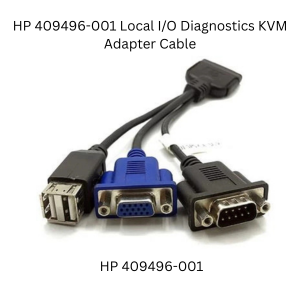
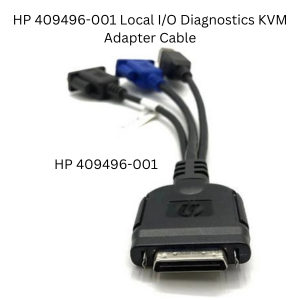
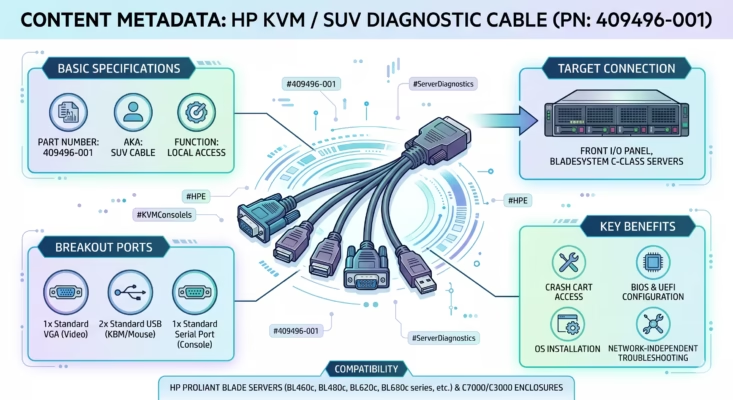
The HP KVM cable 409496-001 is a genuine local I/O (SUV) adapter designed for HP ProLiant BladeSystem c-Class servers. It plugs directly into the front panel of your server blade, immediately breaking out the connection into standard VGA (Video), a DB9 Serial port, and dual USB ports for your crash cart.

Description
Managing a data center is hard work. Therefore, you need fast, physical access to your servers. You must have the HP blade server kvm cable 409496-001. Specifically, this local I/O tool lets you easily set up and fix HP ProLiant c-Class server blades.
What does the kvm cable 409496-001 do?
First, you should know that SUV stands for Serial, USB, and Video. You plug the kvm cable 409496-001 straight into your hardware. Consequently, it changes the special HP blade connection into normal ports. For example, you get one standard VGA port for your screen. You also get two USB ports for your mouse and keyboard. Furthermore, it gives you a DB9 Serial port for deep system access. As a result, this tool saves the day when your network crashes. It also helps if the iLO stops working or you must install a fresh OS.
Key Features of the kvm cable 409496-001
-
Exact Match: We sell the genuine HP adapter. HP officially calls this the kvm cable 409496-001.
-
Video Output: You get one standard VGA plug for a clear monitor display.
-
Easy Typing: You can connect a standard keyboard and mouse using the two USB 2.0 ports.
-
Terminal Access: You can run command-line tools through the DB9 Serial port.
Hot-Pluggable: You do not need drivers. Also, you do not need to restart the system. Just plug it into the front of your HP server blade.
Why You Need Local Access
Remote networks are great. However, you still need physical backup access as a safety net. Network outages or bad firewalls can lock you out completely. Corrupt BIOS updates cause similar problems. Because of this, you need a way to bypass the network. You simply roll up your crash cart and plug in the adapter. Then, you regain full control over your server.
Compatibility & Infrastructure Integration
This adapter is exclusively designed for HP BladeSystem architecture and is fully compatible with popular models within the c3000 and c7000 chassis lines. If you are upgrading your data center infrastructure, be sure to browse our complete catalog of server accessories and hardware to keep your business running smoothly.
For more detailed technical documentation regarding c-Class blade server architecture and front-panel input/output connections, you can refer to the official Hewlett Packard Enterprise (HPE) Support website.
Reviews (0)
Be the first to review “HP Blade Server KVM Adapter Cable (Serial/VGA/USB) – 409496-001”
Related products

Dell Precision 5820 950W PSU





Accessories
Reviews
There are no reviews yet.